NPM
NPM
#PackageManage
换源
npm config set registry http://registry.npmmirror.com检查是否替换成功
npm config get registryNode Package Manager
安装
- 不加包名
根据package.json的依赖环境进行安装
npm intsall- 添加包名
npm install <packname>ORnpm i <packname>npm install安装原理
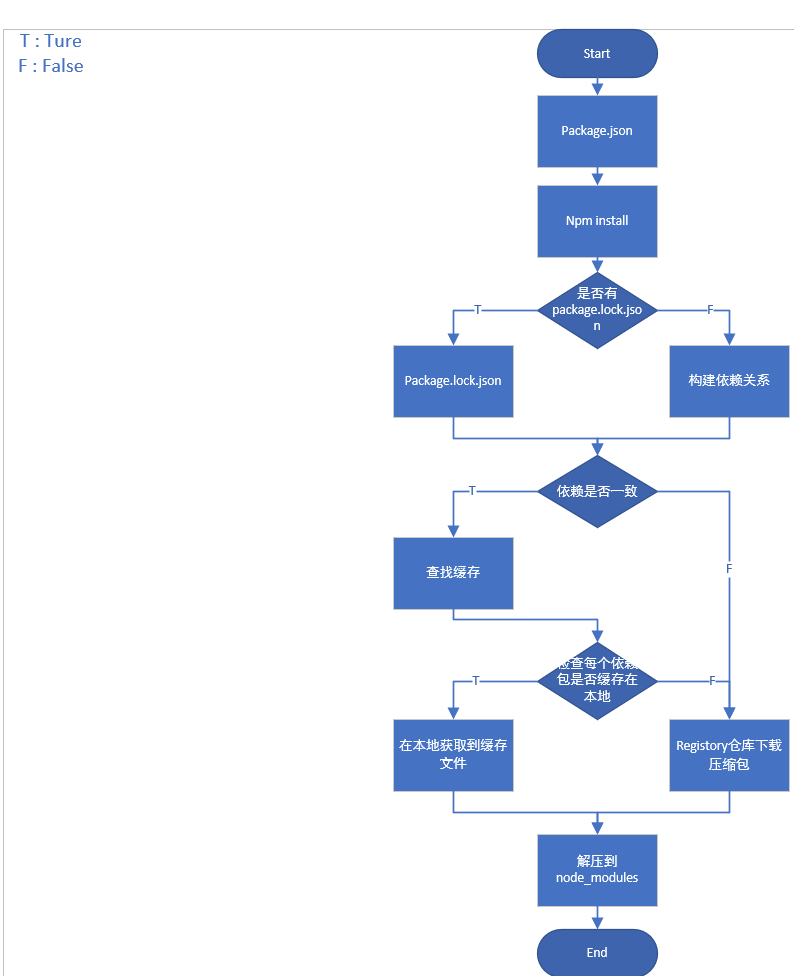
安装到依赖环境
- 生产和开发依赖
关键字: 不加参数,默认值
npm install <packname> --save-devOR
npm i <packname> -D- 开发依赖
关键字: --save-dev
npm install <packname> --save-devOR
npm i <packname> -D查看.npmrc位置
npm config list编辑.npmrc文件
npm config edit查看npm版本
npm -v检查当前npm源 切换回npm默认源
npm get registry切换到最新的淘宝源:
npm config set registry https://registry.npmmirror.com使用阿里云镜像源加速 NPM
npm config set registry https://npm.aliyun.com使用腾讯云镜像源加速 NPM
npm config set registry http://mirrors.cloud.tencent.com/npm/使用华为云镜像源加速 NPM
npm config set registry https://mirrors.huaweicloud.com/repository/npm/返回npm 官方原始镜像
npm config set registry https://registry.npmjs.org/使用那个镜像,只需要 npm config set registry + 对应的镜像网址就好了
npm config set registry查看当前的镜像源
npm config get registry安装方式:
全局安装:
需要全局安装的库一般都会自动配置环境变量,通过环境变量去寻找对应的包
全局安装一般都是工具,例如:
- yarn
- pnpm
- webpack
- typescript
- gulp
- rust
误区:
- 全局安装一般都是工具
- axios, express,koa, vue,element-plus一般不是全局安装
- 尽管全局安装了某些库,但并不是完全在项目保证可用