NGINX 二进制编译安装使用 QUIC 协议
上次读到 0%
前置
- 你应该具有
Linux与QUIC与NGINX的基本知识 - 本教程使用Ubuntu 22.x发行版来进行安装
- Ubuntu 22.x内置openssl3.x版本
- 编译程序需要先搭建编译环境,安装依赖库以及编译所需要的工具
- 本次NGINX选择二进制的安装方式
名词
- QUIC, Quick UDP Internet Connections, 一种基于UDP的协议, 也称为HTTP/3
- NGINX QUIC, NGINX的QUIC的版本, 1.25.0以上版本支持, 常用与代理与负载均衡
- OpenSSL, 一个开源的软件库,用于实现安全套接字层(SSL)和传输层安全(TLS)协议,以及相关的加密、解密、数字签名和密钥交换功能, 第三方QUIC库依赖OpenSSL提供的功能
- quictls/openssl, OpenSSL默认不支持QUIC, 需要第三方库, 本教程选择quictls/openssl库
安装包
- 安装依赖库NGINX二进制编译安装使用QUIC协议
sudo apt updatesudo apt install -y build-essential libtool git mercurial # 编译工具sudo apt install -y libpcre2-dev zlib1g-dev # 依赖库- 下载nginx quic最新版
mkdir -pv /home/nginx/binarycd /home/nginx/binarywget https://nginx.org/download/nginx-1.26.0.ziptar -zxvf nginx-1.26.0.zip -C nginx- 克隆quictls/openssl 最新版本
git clone --depth 1 --recursive https://github.com/quictls/openssl.git编译quictls/openssl
cd /home/nginx/binarymkdir quictlscd ./openssl./Configure --prefix=/home/nginx/binary/quictls --openssldir=/home/nginx/binary/quictls
make ./install_dev
编译nginx, 根据实际需要
--with-http_ssl_module为 HTTPS 提供必要的支持。必需!--with-http_realip_module用于透过代理(反代服务器或 CDN)获取客户端的真实 IP 地址。推荐!--with-http_gzip_static_module允许发送以 .gz 结尾的预压缩文件替代普通文件。推荐!--with-http_gunzip_module是一个过滤器,用于对不支持 gzip 编码方法的客户端解压缩。需要存储压缩数据以节省空间并降低 I/O 成本时,且配置了gzip_static always;时,该模块将非常有用。推荐!--with-http_secure_link_module用于开启防盗链功能,检查请求链接的真实性,保护资源免受未经授权的访问,并限制链接有效时长。 可选--with-http_stub_status_module提供对基本状态信息的访问的支持。可选--with-http_auth_request_module基于子请求结果实现客户端授权。如果子请求返回一个 2xx 响应代码,则允许访问。如果返回 401 或 403,则拒绝访问并抛出相应的错误代码。子请求返回的任何其他响应代码被认为是一个错误。可选--with-http_slice_module模块用在 proxy_cache 大文件的场景,将大文件切片缓存。通常用在 CDN 的 Range 缓存上。可选--with-stream等模块用来实现四层协议的转发、代理或者负载均衡。可选--with-threads和--with-file-aio启用线程池和异步 I/O,可以加快 nginx 运行速度。推荐!--with-compat可以让 nginx 在不重新编译的情况下动态加载模块。推荐!--with-http_v2_module和--with-http_v3_module用于开启 HTTP/2 和 HTTP/3 的支持。必需!--add-module=/usr/src/ngx_brotli将 brotli 压缩模块编译到 nginx,使 nginx 支持 brotli 压缩。推荐!--add-module=/usr/src/ngx_security_headers将 ngx_security_headers 模块编译到 nginx。推荐!
示例配置,
path/to/nginx/sbin/configure替换为实际的位置--with-cc-opt="-I /home/ubuntu/nginx/quictls/include"修改为你的openssl的include的位置--with-ld-opt="-L /home/ubuntu/nginx/quictls/lib64"修改为你的openssl的lib64的位置--with-openssl=/home/ubuntu/openssl修改为你的quictls/openssl的位置
cd /home/nginx/binarychmod +x /home/nginx/binary/nginx./configurecd /home/nginx/binary/nginx./configure \--with-http_ssl_module \--with-http_gzip_static_module \--with-http_gunzip_module \--with-http_secure_link_module \--with-http_stub_status_module \--with-http_slice_module \--with-stream \--with-threads \--with-file-aio \--with-compat \--with-http_v2_module \--with-http_v3_module \--with-cc-opt="-I /home/ubuntu/nginx/quictls/include" \--with-ld-opt="-L /home/ubuntu/nginx/quictls/lib64" \--with-debug \--with-cc-opt="-DNGX_QUIC_DEBUG_PACKETS -DNGX_QUIC_DEBUG_CRYPTO" \--with-openssl=/home/ubuntu/openssl配置结束后,注意查看屏幕上显示的结果,被添加的模块其依赖库应该都被找到,如下面图片所示:
如果存在
QUIC ...found, 继续执行编译nginx, 遇到not found即未找到, 重新写配置
编译nginx
cd /path/to/nginx-<version>
make && \sudo make install
链接库
版本号可能不一样, 去quictls的lib64目录查找是否有一样的name一致的版本号, 如果版本号不一样, 自行替换
sudo ln -s /home/nginx/binary/quictls/lib64/libcrypto.so.81.3 /usr/lib/libcrypto.so.81.3sudo ln -s /home/nginx/binary/quictls/lib64/libssl.so.81.3 /usr/lib/libssl.so.81.3检查NGINX信息
默认情况下, nginx安装在/usr/local/nginx/sbin目录, 如果想要在任意地方都可以运行, 加入到系统环境变量即可
/usr/local/nginx/sbin/nginx -V正确安装的情况下应该有如下输出:
添加自启(可选)
添加 nginx.service 使其开机自启
默认情况下, nginx的位置在/usr/local/nginx/sbin/, 不一致则自行替换/usr/local/nginx/sbin/为你的nginx目录
cat > /usr/lib/systemd/system/nginx.service <<'EOF'[Unit]Description=The NGINX HTTP and reverse proxy serverAfter=syslog.target network-online.target remote-fs.target nss-lookup.targetWants=network-online.target
[Service]Type=forkingPIDFile=/var/run/nginx.pidExecStartPre=/usr/local/nginx/sbin/nginx -tExecStart=/usr/local/nginx/sbin/nginxExecReload=/usr/local/nginx/sbin/nginx -s reloadExecStop=/bin/kill -s QUIT $MAINPIDPrivateTmp=true
[Install]WantedBy=multi-user.targetEOF
重新加载 systemd
systemctl daemon-reload开机启动
systemctl enable nginx.service常用指令
- sudo /usr/local/nginx/sbin/nginx -s stop 停止NGINX
- sudo /usr/local/nginx/sbin/nginx -s reload 重新读取NGINX配置(每次修改nginx.conf配置都需要执行)
- systemctl status nginx.service 查看状态
- systemctl start nginx.service 启动
- systemctl restart nginx.service 重新启动
- systemctl reload nginx.service 重新读取配置
配置QUIC协议
看不懂配置文件, 只需要修改有注释的地方, 替换为注释提示的信息即可, 根据你的实际需求来定制
cat > nginx.conf <<EOFuser  root;  # 定义运行 Nginx 工作进程的用户,在这里设置为 'root'worker_processes  1;  # 设置工作进程的数量
error_log  /usr/local/nginx/logs/error.log warn;  # 错误日志文件的路径,日志级别设置为 'warn'pid        /var/run/nginx.pid;  # 存储主进程 ID 的文件
events {    worker_connections  1024;  # 默认工作连接数设置为 1024    #worker_connections  65535;  # 设置每个工作进程的最大连接数,这里为 65535}
http {    include       mime.types;  # MIME 类型文件的包含指令    default_type  application/octet-stream;  # 默认 MIME 类型设置
    #log_format  main  ...;  # 默认日志格式定义
    # 自定义的日志格式,包括 QUIC 相关的变量    log_format quic '$remote_addr - $remote_user [$time_local] '                        '"$request" $status $body_bytes_sent '                        '"$http_referer" "$http_user_agent" "$http3"';
    access_log  logs/access.log  quic;  # 访问日志的路径和日志格式    sendfile on;  # 启用或禁用 sendfile 模式    gzip  on;  # 启用或禁用 gzip 压缩    keepalive_timeout  65;  # 保持连接的超时时间设置
    # include /etc/nginx/conf.d/*.conf;  # 额外配置文件包含指令    server {        listen 80;        server_name server_name; # server_name        return 301 https://host$request_uri; # webside    }
    server {        server_name sumery.cn www.sumery.cn;  # 服务器名称
        # UDP listener for QUIC+HTTP/3        listen 443 quic reuseport so_keepalive=on backlog=4096;  # 为 QUIC+HTTP/3 设置 UDP 监听器        listen 443 ssl reuseport default_server so_keepalive=on backlog=4096;  # 为 HTTPS 设置监听器
        http2 on;  # 启用 HTTP/2 协议        # 以下为各种 HTTP 安全相关头部的设置        add_header Strict-Transport-Security "max-age=63072000; includeSubdomains; preload";        add_header X-XSS-Protection "1; mode=block" always;        add_header X-Frame-Options SAMEORIGIN always;        add_header X-Content-Type-Options nosniff;        add_header X-Frame-Options "DENY";        add_header Alt-Svc 'h3=":443"; ma=86400, h3-29=":443"; ma=86400';
        # SSL/TLS 相关配置        ssl_protocols TLSv1.3 TLSv1.2;  # 设置支持的 SSL 协议版本        # ssl_ciphers ...;  # 设置 SSL 密码套件        ssl_prefer_server_ciphers on;  # 优先使用服务器的密码套件        ssl_ecdh_curve X25519:P-256:P-384;  # 设置 ECDH 曲线        ssl_early_data on;  # 启用 TLS 1.3 的 0-RTT 特性        ssl_stapling on;  # 启用 OCSP Stapling        ssl_stapling_verify on;  # 启用 OCSP Stapling 的验证        proxy_set_header Early-Data $ssl_early_data;  # 设置 Early-Data 头以防止重放攻击
        # SSL 证书路径配置        ssl_certificate     /usr/local/nginx/ssl/sumery.cn_nginx/sumery.cn_bundle.crt;  # SSL 证书路径        ssl_certificate_key /usr/local/nginx/ssl/sumery.cn_nginx/sumery.cn.key;  # SSL 证书密钥路径
        location / {            root   html;  # 设置根目录路径            index  index.html index.htm;  # 设置默认index首页文件
            # 添加 HTTP/3 相关的头部            add_header QUIC-Status $http3;            add_header Alt-Svc 'h3=":443"; ma=86400'; # used to advertise the availability of HTTP/3            #add_header Alt-Svc 'h3-27=":443"; h3-28=":443"; h3-29=":443"; ma=86400; quic=":443"';        }    }}EOF
重载配置: 格式
/path/to/sbin/nginx -s reload示例:
/usr/local/nginx/sbin/nginx -s reload测试
- 测试nginx配置语法问题:
sudo /usr/local/nginx/sbin/nginx -t语法正常为如下输出:
nginx: the configuration file /usr/local/nginx/conf/nginx.conf syntax is oknginx: configuration file /usr/local/nginx/conf/nginx.conf test is successful- 检查相关端口号及服务:
lsof -i:443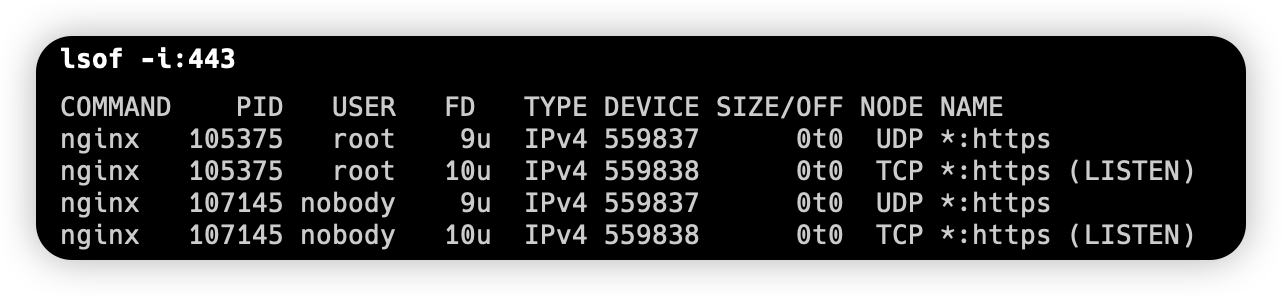
- 浏览器测试 使用以下浏览器来进行测试
- Firefox 90+
- Chrome/Egde 92+ (QUIC version 1)
需要浏览器支持QUIC协议并默认开启QUIC选项
- Firefox地址栏访问:
about:config输入:network.http.http3.enabled, 选择为true - Chrome 浏览器地址栏访问:
chrome://flags输入:enable-quic选择为Enable启用 - Egde 浏览器地址栏访问:
chrome://flags或者egde://flags输入:enable-quic选择为Enable启用
- 如果是公有云厂商的服务器, 需要打开
443的UDP和TCP端口, 取决于你的开放的端口, 默认为443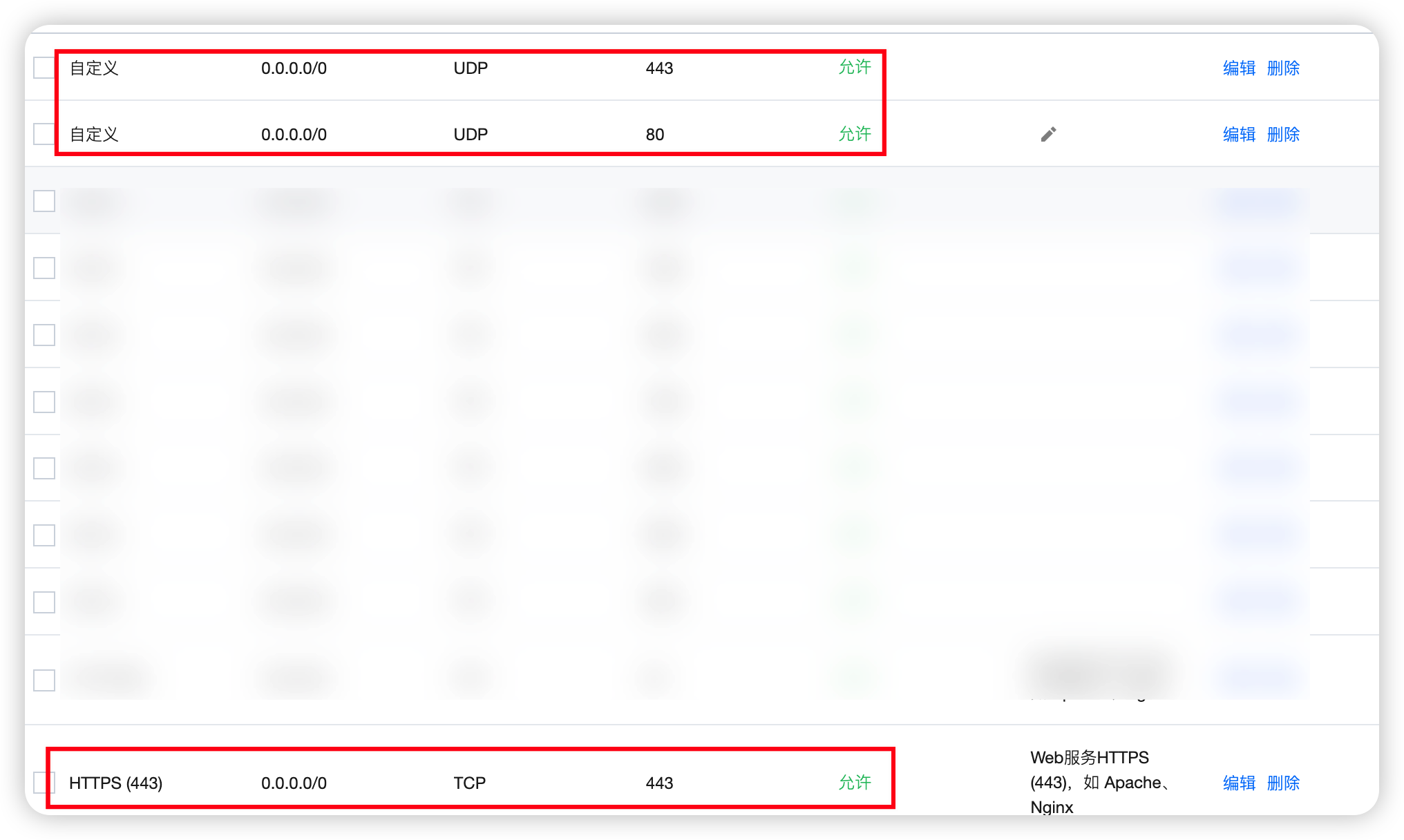
- 当你部署到公网之后, 访问http3check.net上输入域名进行测试